Yeah, nothing seems related to locking the screen.
Perhaps try some cinnamon related place and they might know how to get the related info (I haven't used cinnamon).
comments
comment on
Sleep AND lock when lid is closed?
comment on
Sleep AND lock when lid is closed?
5 minutes, 5 hours, doesn't matter. And it does actually go to sleep when closed.
comment on
Sleep AND lock when lid is closed?
Are you immediately opening the screen, or does it still do it after sitting in sleep for like 5 minutes?
comment on
Sleep AND lock when lid is closed?
cinnamon-screensaver/zara,now 6.4.1+zara amd64 [installed]

I don't see any errors at all.
Dec 08 23:17:01 Mint-Yoga CRON[10491]: (root) CMD (cd / && run-parts --report /etc/cron.hourly)
Dec 08 23:17:01 Mint-Yoga CRON[10490]: pam_unix(cron:session): session closed for user root
Dec 08 23:17:18 Mint-Yoga dbus-daemon[780]: [system] Activating via systemd: service name='org.freedesktop.hostname1' unit='dbus-org.freedesktop.hostname1.service' requested by ':1.190' (uid=1000 pid=10482 comm="/usr/bin/gnome-screenshot --gapplication-service" label="unconfined")
Dec 08 23:17:18 Mint-Yoga systemd[1]: Starting systemd-hostnamed.service - Hostname Service...
Dec 08 23:17:18 Mint-Yoga dbus-daemon[780]: [system] Successfully activated service 'org.freedesktop.hostname1'
Dec 08 23:17:18 Mint-Yoga systemd[1]: Started systemd-hostnamed.service - Hostname Service.
Dec 08 23:17:51 Mint-Yoga systemd-resolved[723]: Clock change detected. Flushing caches.
Dec 08 23:17:51 Mint-Yoga systemd-timesyncd[733]: Contacted time server 185.125.190.57:123 (ntp.ubuntu.com).
Dec 08 23:17:51 Mint-Yoga systemd[1]: apt-daily.service - Daily apt download activities was skipped because of an unmet condition check (ConditionACPower=true).
Dec 08 23:18:09 Mint-Yoga systemd[1]: systemd-hostnamed.service: Deactivated successfully.
comment on
Sleep AND lock when lid is closed?
Do you have a screenlocker program installed and setup?
A quick search tells me that cinnamon-screensaver is its name for Cinnamon.
Perhaps you can also run journalctl -f in a terminal and then click the lock button in the menu, to see if there is any error related to that at that moment.
comment on
Sleep AND lock when lid is closed?
Something is actually preventing the system from being locked at all. If I click the lock icon in the menu above the log out button, nothing happens.
comment on
Sleep AND lock when lid is closed?
You would think so, wouldn't you? But no, it lets me pick right back up where I left off without a password prompt. I thought maybe I had forgotten to set a password altogether, but I hadn't.
comment on
Sleep AND lock when lid is closed?
Because when it suspending it will already be locked after waking
comment on
Keyboard shortcuts priority
You are about to find out how much you hate the caps lock key's unjustifiable real estate.
Welcome.
comment on
Keyboard shortcuts priority
I don't have the answer to your problem, but this sort of thing can easily be done with a Vial compatible mechanical keyboard.
VPN providers don't have unlimited IPs. At some point, you've blocked all the VPN IPs, and suddenly it gets much harder to abuse the site.
If this doesn't solve anything in your eyes, what exactly should a provider do when they're getting hammered by VPN IPs? Should they tell their customers "sorry our service is offline, but there might be people legitimately attempting to access it through the IPs that are DDoSing us"?
So they ban that IP or range of IPs and the offender moves to a different IP in a matter of seconds meanwhile the people still trying to legitimately access the site from that original IP can get fucked. Doesn't seem like it solves anything much to me.
nope, no vpn
They usually do it because of prior abuse by other VPN customers.
It's annoying how many sites do this.
Do you have a VPN? I can access it from Mullvad Dublin but get the Forbidden message with Mullvad Amsterdam.
It is probably ip based since they are asking for your ip. Unplug your modem for 10 seconds, plug it back in, and you will get a new ip address and should be to access the site again
thank you for everything, you're fixing both my problems.
Also, ironically, the fucking FAQ with the 403 forbidden solution is behind the goddamn 403, but thanks to you, at least I have the email address.
I second the dark reader recommendation, it'll save your eyeballs and works on (almost) every site. You can even install it on Firefox mobile and its various forks
Edit: https://addons.mozilla.org/en-US/firefox/addon/darkreader/
Debian, like Wikipedia, uses MediaWiki. On MediaWikis, Dark Reader will let you view a wiki without needing to create an account and set the thing to dark mode.
EDIT:
https://wiki.debian.org/DebianWiki/FAQ
Q: Access to wiki.debian.org is blocked with 403 Forbidden
Please mail wiki@debian.org with your IP address.
Might try that.
EDIT2: Sorry, take it back about using MediaWiki. Debian uses MoinMoin. But it still does work with Dark Reader.
comment on
I do not understand these terms.
Everyone is explaining what systemd is, but if you're just someone who wants to use their computer it doesn't matter if you know what it is or not.
I've been using Linux for years and still don't really know what it is. I don't even know if my current distribution uses it or not.
comment on
I do not understand these terms.
This seems to be a good way to see the things systemd does. Though it is from 2014, so there might have been many changes.
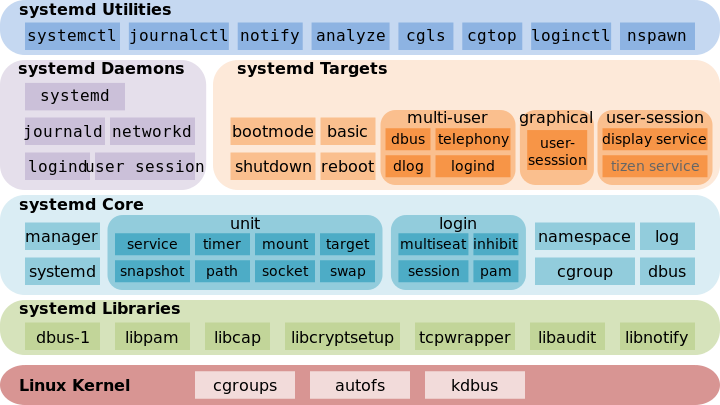
Heh, you can actually set a picture as the "text" of a clickable link. Neat.
comment on
I do not understand these terms.
The init system is the first thing that runs on boot and kind of allows other stuff to run. It's not really something the average user needs to worry about.
Systemd is probably the most common init on Linux distros these days. Some people don't like it. One reason is because it does a lot of things in addition to what traditional init systems do and that goes against the Unix philosophy (do one thing and do it well).
SysV, OpenRC, and runit are all more traditional init systems. I don't really have experience with them.
Devuan is basically just Debian without systemd. It's name is derived from Debian and VUA (Veteran Unix Admins, if I remember correctly).
Debian is a Linux distribution, meaning that it's a complete operating system based around the Linux kernel.
Ubuntu is another distribution and is derived from Debian. Ubuntu makes a lot of changes from Debian. It would be better to think of their relationship as parent and child rather than a superhero's alter ego.
Ubuntu is run by a company called Canonical. Over the years Canonical has made a number of controversial decisions (which I won't get in to) and that's why a lot of people don't like Ubuntu.
Debian, on the other hand is community run. Additionally, they tend to not make radical changes since their focus is on providing a stable operating system.
As for why there are more Ubuntu based distros than Debian, I'm not certain. My guess is because Ubuntu is (or was?) more user friendly out of the box and it was a lot of people's first distro for many years.
For your last question, I'd just go with the Debian version. As a beginner it would probably be easier to find help with that version. The Devuan version is aimed at more experienced users and old school sysadmins.
comment on
I do not understand these terms.
I'll TLDR the answers you've gotten already: Stick to systemd. It works.
..because beyond that I think the debate of systemd is mostly astrology at this point: Systemd is basically what handles startup and monitoring of services on your PC. It has largely replaced the older initd on most systems.
Systemd was somewhat controversial when it was first adopted by many distros as it was seen as bloated compared to initd, plus it was a fundamental shift in how services were handled.
Today it is a mature system and while it still has its detractors, I think it mainly comes down to astrology and elitism. Personally I've used both for ages, and it's fine. So was initd. I just wish DNS wasn't rolled into systemd, but I don't care that hard, though.
comment on
I do not understand these terms.
Debian makes the deliberate choice to have older versions of software in the repository so that there is plenty of time to become aware of and fix any problems that come up. This is a reasonable stance to take, but in practice often newer software is stable enough, so Ubuntu essentially starts with Debian as a base and then adds newer version of software into the repository. This approach made it very popular, and as a result it effectively became a standard (in addition to RedHat/Fedora), which is significant because it means that a lot of software is now packaged to work best with Ubuntu. Both of these factors motivate many distributions to base themselves on Ubuntu. Unfortunately, Ubuntu also adds in a lot of stuff that... people disagree with, but the good news is that a distribution is just a collection of software, so there is nothing stopping someone from picking all of the parts of Ubuntu that they like, and leaving out all of the parts that they don't.
An init system is essentially infrastructure that runs underneath the hood to orchestrate what things get activated and when. Some people (not myself) consider systemd to be overly complicated so they prefer something that they consider to be simpler, and others oppose systemd on essentially ideological grounds for not being sufficiently "Unix-like". If you do not understand enough about init systems to understand the difference between these systems and their pros and cons, then I would highly recommend that you not care at all about what your init system is (outside of curiosity for its own sake), and be a little suspicious of distributions for which their init system is their main selling point compared to other distributions, because it probably means that they focus their time and energy on things that you have do not care about in practice. (Having said that, don't get me wrong: the great thing about Linux is that if someone really cares about this kind of thing, then they are completely free to tinker to their heart's content until it is exactly the way that they want it!)