The player's view is just another normal. If you set an angle range for how large their field of view is, and then check that the player's normal and the vector from object to player are parallel enough, it shouldn't be too hard.
comments
A hint i found on Reddit (yikes, i know) from someone who made a nice github with their solution.
Their idea is to pass the player position to the objects shaders, and then to get 2 differents normals : from object to player, and from object to camera. Once you have those, you can make a dot product to tell if they are in the same direction or not (>0.0 if their angle is less than 90°, <0.0 if it's greater, 0.0 would correspond to a 90° angle). Beware, i believe it's best to normalize both your vector to a length of 1, before using dot product if you want to get accurate results.
So once you have a negative dot product, you know both direction are opposite, so the object is between the camera and the player, and should be hidden.
On top of that, they limit that effect to a small circle around the player, to avoid making objects transparent all over the screen. You'd have to find out how to limit that effect to the field of view of the player, and i sadly have no real idea about that.
comment on
GodotCon Boston - Save the date!
Yeah, who's crazy enough to play with ICE like that? This must've been organised by people already living in the US for people already living there. If Europeans did, they must be Dutch or French, because what was in that blunt???
comment on
GodotCon Boston - Save the date!
You want human beings to go to the United States of Amurica for any reason at all?
That ain't happening, I don't want to get jailed, thank you very much
comment on
GodotCon Boston - Save the date!
I like Godot but not enough to go to the United States.
comment on
Godot usage and engine growth
I started using Godot in 4.0 and it's simply amazing. Doesn't take any disk space, opens in seconds, all tools needed in one place and you start creating in a matter of seconds.
I'm so glad to leave unity behind.
comment on
Godot usage and engine growth
The data fits the meme :D

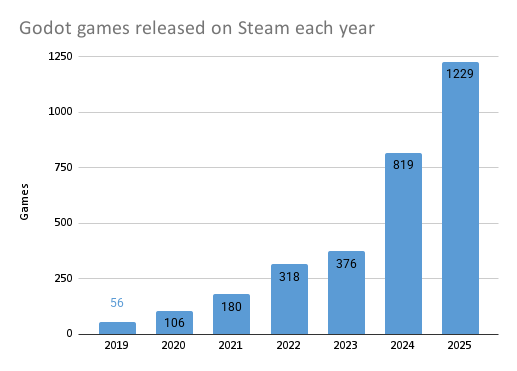
I agree with Sevon and if you want to learn more about the benefits, look up “type safety”.
Mistakes are easy to make and you want them to show up immediately instead of randomly at runtime. If you have lots of tiles, change the fields later, or manipulate the data in code you'll make a typo or forget something eventually.
With a class, every tile is guaranteed to have all the fields, and if you give the fields explicit types, they're always guaranteed to be the correct type. If you do something wrong, you won't have to figure out why it's broken later, because the editor shows red before you even run it.
Also, the editor autofill only works when it knows what it's working with.
Im a new to all this so still learning whats available to solve the problems. From what I understand that would make each tile an object and I could call its properties like tile.move_speed but thats the same as a dictionary. I dont get what the difference is or what advantages a class would provide.
You should probably use a class instead of a dictionary for tile attributes.
Going through the property list is pretty weird too.
comment on
Godot JRPG
Oh this is really tempting me haha. One game at a time 😂. I need to not jump projects again and finish one
comment on
Godot 4 renderers: A Technical Comparison
How do you figure? Im pretty bad at spotting text slop ...
comment on
Godot 4 renderers: A Technical Comparison
AI slop website :(
comment on
Godot 4 renderers: A Technical Comparison
I chose compatibility because I thought that it would be better performance since I was not using any of the advanced features in Forward+. The rendering I have is pretty flat and simple and I was hoping this post would compare the performance of the different renderers.
comment on
Godot 4.7 Beta is Here!
That's reasonable, my project are all small half formed hobby projects. One day I might make something to publish.
comment on
Godot 4.7 Beta is Here!
You don't have to. 4.6 will continue to be supported for a while. You can jump up if you want. Even 4.5 is still getting bug fixes.
comment on
Godot 4.7 Beta is Here!
If you have a long term project that's a decent ways through development, and there isn't a must have feature in the new release I'd probably keep my project on the old version tbh.
comment on
Godot 4.7 Beta is Here!
I just went from 4.4 to 4.6, and now you are telling me I am going to have to go to 4.7 soon.
what are the benefits to using it in Godot?
Primarily performance and type safety. You can get some type safety with typed GDScript, but it doesn't really compare to Rust. You also get all the language constructs for free and access to the entire Rust ecosystem, as you can depend on basically any crate you like.
Does the game run any faster than if it were programmed in CO# or GD script?
Yes, you can get more performance out of your CPU-intensive code compared to GDScript. If you have complex calculations or a large amount of data to process, you will fare better with Rust. The interoperability between Rust and GDScript is also quite good, so you can mix and match as much as you like. I can't really say how it compares to C#, as I have never tested it myself.
Is web more stable with it?
I'm not sure what you mean by more stable, but web exports are possible, which is not currently supported with C#. Rust also does not rely on a runtime like C#, which should give you a smaller export size compared to C#.
As a rust-curious dev, what are the benefits to using it in Godot? Does the game run any faster than if it were programmed in CO# or GD script? Is web more stable with it?
comment on
Godot 4.7 Beta is Here!
Damn! Godot moves so fast! It’s wonderful.
looks like some expandable thing to me, i would probably click it if I didnt see this post
Here's the article from Godot about it: https://godotengine.org/article/hdr-output-arrives-in-godot-4-7/
... Wow.
Unless I'm mistaken, most... AAA engines can't even figure that out correctly, proper HDR on Linux, or just half the time on Windows as well.