[–] 1 point 3 months ago*

For me its Musicbrainz (listenbrainz.org) on android use spotube it has musicbrainz plugin so it will scrobble to your account on listenbrainz. listenbrainz has recommendation playlists like weekly discover, weekly jams which i think are much better than Spotify in my experience. on pc I use linux so i have made a custom tui which scrobbles to listenbrainz using their api and streams music from youtube using yt-dlp (its vibe coded). https://codeberg.org/mobsenpai/lb-tui

There are other apps as well but for my needs i had to make my own. Now you should definitely try it for yourself see how it works for you, listenbrainz also has a youtube integration so it will play songs in mini player, also with musicbrainz you can easily add any songs missing from the platform but in my experience I was able to find 90% of songs and artists i listen to.

I dont like ripping or keeping offline copy because i have roughly 4000 songs in my playlist and its not easy keeping it arranged and move it to other devices. and i need music discovery too hence this combination works for me, although not perfect.

  • source
  • [–] [S] 1 point 4 months ago

    Yeah it's a little manual to setup and is not very declarative and dynamic which is why I was keen on just letting my qt apps auto theme with gtk. For now I am just using qtstyleplugins which has the older qt5gtk2 and it works with both the qt6 and qt5 apps but it themes with gtk2 which is largely being deprecated and not supported by newer themes so was just concerned.

  • source
  • parent
  • context
  •  

    So I came here while researching for the problems with qt5 theme. So in the archi wiki it says -

    3.1 QGtk3Style
    This is a platform theme built into qt5-base starting with version 5.7.0 [2] and qt6-base. It can be used to style Qt5 and Qt6 applications according to current GTK3 style. It can be enabled by setting the following environment variable: QT_QPA_PLATFORMTHEME=gtk3. 
    

    I am on nixos and if i set the same envionment variable qt6 apps like pcmanfm-qt, qbittorrent correctly use the same colors as my gtk3 theme, but it seems qt5 apps (like wpa_supplicant_gui, keepassxc, picard) even though in logs they seem to load the plugin, dont theme accordingly and show the default white color. I just want to know is the plugin abandoned? Meaning its no use trying to wait for it to update and be fixed or should i just switch to qtstyleplugins for qt5 apps?


    I Can confirm this if i run

    QT_DEBUG_PLUGINS=1 QT_QPA_PLATFORMTHEME=gtk3 wpa_gui 2>&1 | grep -i gtk3
    

    and logs show

    QFactoryLoader::QFactoryLoader() looking at "/nix/store/64qmp7fap3740hxd2bsnpy10s9ndy5qx-qtbase-5.15.18-bin/lib/qt-5.15.18/plugins/platformthemes/libqgtk3.so"
    Found metadata in lib /nix/store/.../libqgtk3.so, metadata=
                "gtk3"
        "className": "QGtk3ThemePlugin",
    Got keys from plugin meta data ("gtk3")
    loaded library "/nix/store/.../libqgtk3.so"
    

    • Note: The old qt5-styleplugins do work just need to set the variabled to gtk3 instead of gtk2

    Side by side comparison

    • qbittorrent (qt6 app)
    Its using qt6, i can confirm
    nix why-depends nixpkgs#qbittorrent nixpkgs#qt6.qtbase
    /nix/store/i8r2n73xzlxk7sfchjlkdxajs8jbqbv0-qbittorrent-5.2.1
    └───/nix/store/wzvm2pvf98a71v0scgfhmi01lqcxahfr-qtbase-6.11.0
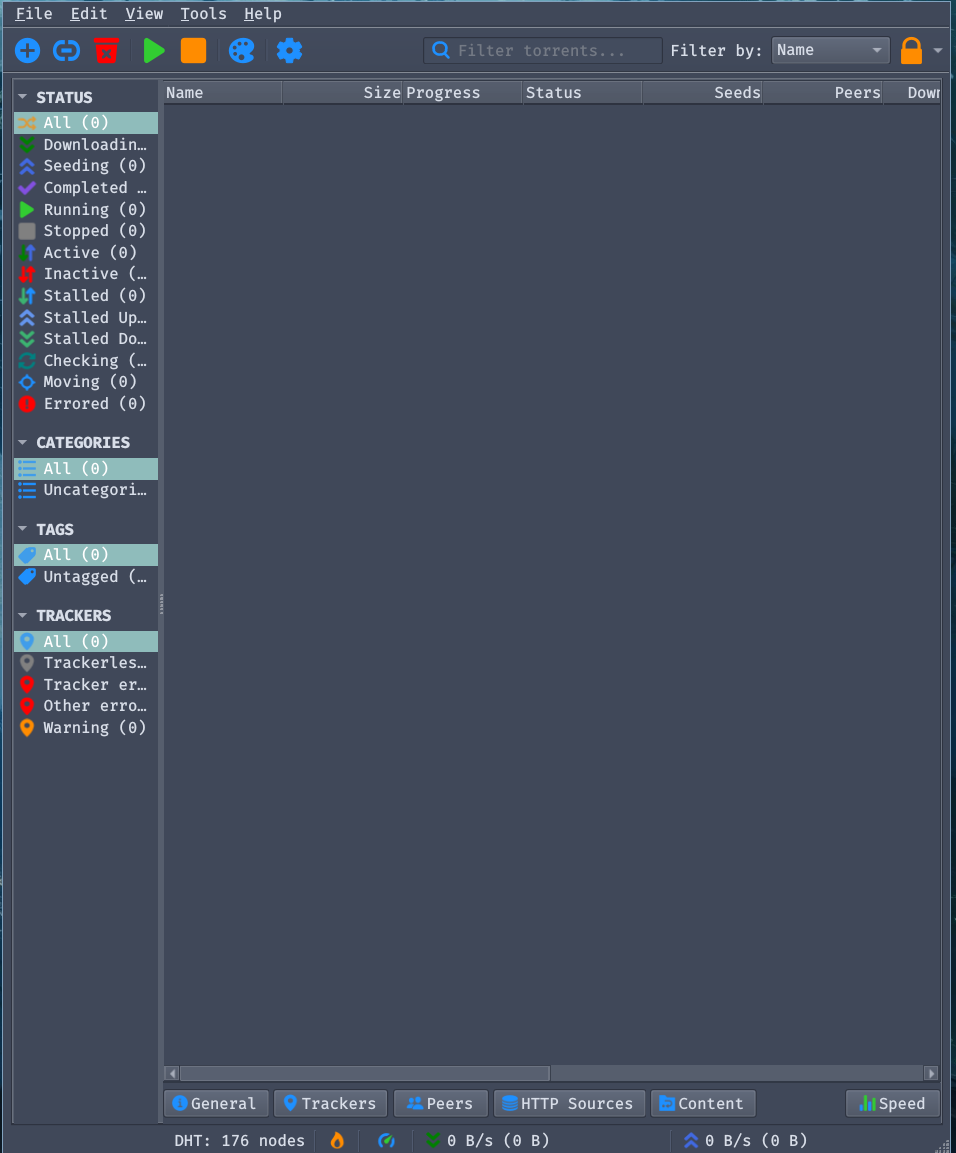
    

    f0137705-cf5e-4308-a19d-9858555b8163-image.png

    • picard (qt5 app)
    Its using qt5, i can confirm
    nix why-depends nixpkgs#picard nixpkgs#qt5.qtbase
    /nix/store/wzqlnryvnjl95a93fiwwivlbz3ypixk7-picard-2.13.3
    └───/nix/store/64qmp7fap3740hxd2bsnpy10s9ndy5qx-qtbase-5.15.18-bin
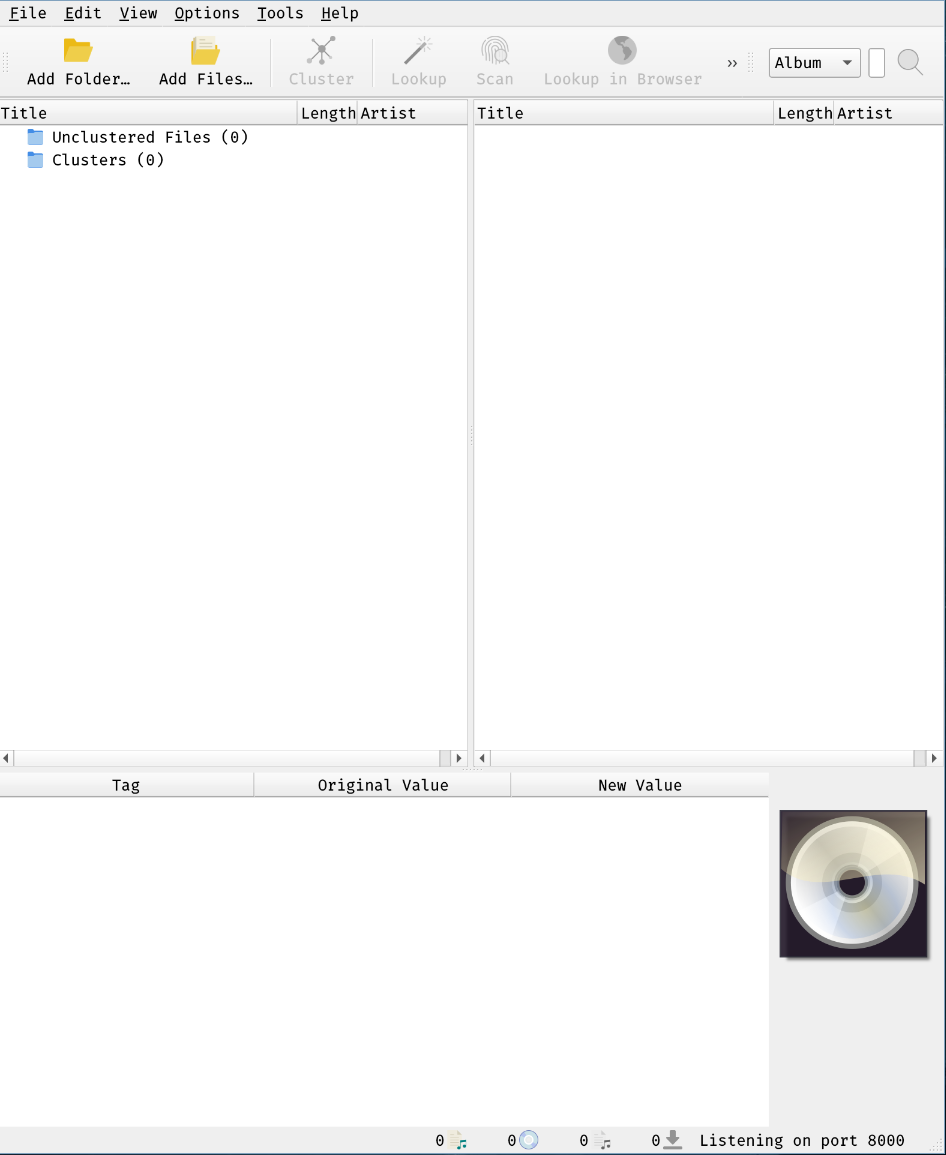
    

    aa8041b4-f523-4779-a880-3b3e3d8e37d0-image.png


    I can confirm the same behaviour for the other aforementioned apps.


    Edit: Turns out it was just qt5 apps acting up, wpa-gui has been ported to qt6 and is upcoming in next updates. and I have tested it, it correctly ports the gtk theme to qt.

    So I came here while researching for the problems with qt5 theme. So in the archi wiki it says -

    3.1 QGtk3Style
    This is a platform theme built into qt5-base starting with version 5.7.0 [2] and qt6-base. It can be used to style Qt5 and Qt6 applications according to current GTK3 style. It can be enabled by setting the following environment variable: QT_QPA_PLATFORMTHEME=gtk3. 
    

    I am on nixos and if i set the same envionment variable qt6 apps like pcmanfm-qt, qbittorrent correctly use the same colors as my gtk3 theme, but it seems qt5 apps (like wpa_supplicant_gui, keepassxc, picard) even though in logs they seem to load the plugin, dont theme accordingly and show the default white color. I just want to know is the plugin abandoned? Meaning its no use trying to wait for it to update and be fixed or should i just switch to qtstyleplugins for qt5 apps?


    I Can confirm this if i run

    QT_DEBUG_PLUGINS=1 QT_QPA_PLATFORMTHEME=gtk3 wpa_gui 2>&1 | grep -i gtk3
    

    and logs show

    QFactoryLoader::QFactoryLoader() looking at "/nix/store/64qmp7fap3740hxd2bsnpy10s9ndy5qx-qtbase-5.15.18-bin/lib/qt-5.15.18/plugins/platformthemes/libqgtk3.so"
    Found metadata in lib /nix/store/.../libqgtk3.so, metadata=
                "gtk3"
        "className": "QGtk3ThemePlugin",
    Got keys from plugin meta data ("gtk3")
    loaded library "/nix/store/.../libqgtk3.so"
    

    • Note: The old qt5-styleplugins do work just need to set the variabled to gtk3 instead of gtk2

    Side by side comparison

    • qbittorrent (qt6 app)
    Its using qt6, i can confirm
    nix why-depends nixpkgs#qbittorrent nixpkgs#qt6.qtbase
    /nix/store/i8r2n73xzlxk7sfchjlkdxajs8jbqbv0-qbittorrent-5.2.1
    └───/nix/store/wzvm2pvf98a71v0scgfhmi01lqcxahfr-qtbase-6.11.0
    

    f0137705-cf5e-4308-a19d-9858555b8163-image.png

    • picard (qt5 app)
    Its using qt5, i can confirm
    nix why-depends nixpkgs#picard nixpkgs#qt5.qtbase
    /nix/store/wzqlnryvnjl95a93fiwwivlbz3ypixk7-picard-2.13.3
    └───/nix/store/64qmp7fap3740hxd2bsnpy10s9ndy5qx-qtbase-5.15.18-bin
    

    aa8041b4-f523-4779-a880-3b3e3d8e37d0-image.png


    I can confirm the same behaviour for the other aforementioned apps.

    [–] [S] 2 points 9 months ago

    Thank you 😊. This is so true, this is definitely the charm of nixos, like having to do this once and then not having to worry about it again gives me a peace of mind. Still this should be natively in the kernel itself, and when I said I will try to get this upstream i had no idea it would be this tiresome. It seems a patch is already put up by someone (source - cough.. cough.. ai), but I still have to find the specific patch on their mailing lists.

  • source
  • parent
  • context
  • [–] [S] 2 points 9 months ago

    So turns out making this patch upstream so it gets into the Linux kernel is not as easy as to open to pull request. There's this setting up of git email and what not, but with my searches it seems this patch is already made by someone and should be implemented in the kernel 6.19, but take this with a grain of salt. I will update this post if I find the patch file but for now I am assuming this fixed in 6.19. And yes I was hesitant to to try this but the desperation got over me, as I just can't have anything "not work" it irks me the wrong way, so I just went ahead with it.

  • source
  • parent
  • context
  • [–] [S] 3 points 9 months ago (2 children)

    Brother guess what? It actually fixed it. OMG I am soo happy, at last it got fixed, i was trying it for the last week and didn't work, but you swoop and in an instant fixed it. I just can't thank you enough really. I am really greatful to you.

  • source
  • parent
  • context
  •  

    [Solved] cross-posted from: https://lemmy.world/post/41957406

    Exact problem as this archwiki forum post

    I have also tried everything and at last here I am asking for any help, otherwise I don't think I would be able to continue using Linux on this laptop. I've tried everything from changing the kernel package to enabling all firmwares to using every kernel parameter I can find everything, nothing says any error or something anywhere. Only error i can find is hci device capabilities -22

    Edit: The patch i needed was to add the driver info in btusb.c file. In nixos this is how you do it

      boot = {
        kernelPatches = [
          {
            name = "add-realtek-8852ce-btusb";
            patch = ./btusb.patch;
          }
        ];
    }
    

    first what you should do is git clone the linux kernel version you are using check using uname -r for me it was 6.12.(whatever, doesn't matter)

    git clone --depth=1 git://git.kernel.org/pub/scm/linux/kernel/git/stable/linux.git v6.12
    

    then find the btusb.c file in drivers/bluetooth/ and add the line

    { USB_DEVICE(0x13d3, 0x3612), .driver_info = BTUSB_REALTEK |
    BTUSB_WIDEBAND_SPEECH },
    

    after these lines

    static const struct usb_device_id quirks_table[] = {
     						     BTUSB_WIDEBAND_SPEECH },
     	{ USB_DEVICE(0x0cb8, 0xc558), .driver_info = BTUSB_REALTEK |
     						     BTUSB_WIDEBAND_SPEECH },
    

    now we have made chages to this file right? it will be shows in git diff, so now you should be able to do git diff > btusb.patch this will create a .patch file, now copy this file to wherever folder you put the nixos configuration in, most likely /etc/nixos if not using custom config. Thats it!, now rebuild the configuration and DONE. props to @Maiq.

    Author of patch: vedantsg123

    I will try to get this patch upstream to not having to do this manually.


    [SOLVED] Exact problem as this archwiki forum post

    I have also tried everything and at last here I am asking for any help, otherwise I don't think I would be able to continue using Linux on this laptop. I've tried everything from changing the kernel package to enabling all firmwares to using every kernel parameter I can find everything, nothing says any error or something anywhere. Only error i can find is hci device capabilities -22

    Edit: The patch i needed was to add the driver info in btusb.c file. In nixos this is how you do it

      boot = {
        kernelPatches = [
          {
            name = "add-realtek-8852ce-btusb";
            patch = ./btusb.patch;
          }
        ];
    }
    

    first what you should do is git clone the linux kernel version you are using check using uname -r for me it was 6.12.(whatever, doesn't matter)

    git clone --depth=1 git://git.kernel.org/pub/scm/linux/kernel/git/stable/linux.git v6.12
    

    then find the btusb.c file in drivers/bluetooth/ and add the line

    { USB_DEVICE(0x13d3, 0x3612), .driver_info = BTUSB_REALTEK |
    BTUSB_WIDEBAND_SPEECH },
    

    after these lines

    static const struct usb_device_id quirks_table[] = {
     						     BTUSB_WIDEBAND_SPEECH },
     	{ USB_DEVICE(0x0cb8, 0xc558), .driver_info = BTUSB_REALTEK |
     						     BTUSB_WIDEBAND_SPEECH },
    

    now we have made chages to this file right? it will be shows in git diff, so now you should be able to do git diff > btusb.patch this will create a .patch file, now copy this file to wherever folder you put the nixos configuration in, most likely /etc/nixos if not using custom config. Thats it!, now rebuild the configuration and DONE. props to @Maiq.

    Author of patch: vedantsg123

    I will try to get this patch upstream to not having to do this manually.

    view more: next ›