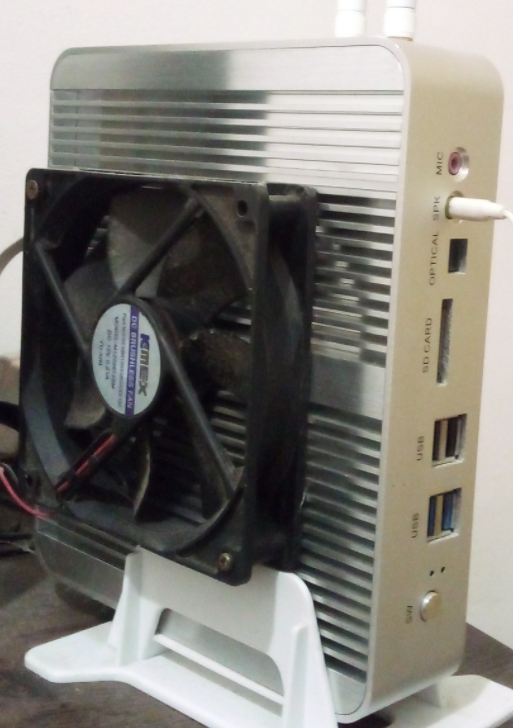
I got a pc that suffers from severe heating problems because of its poorly designed passive cooling case. I tried several strategies to put temperature under control, did a lot of tests with thermald, but ended up hacking a fan into the case. However, I still have problems with ssd temperatures.

Right now, as I write this, the nvme ssd is at 67ºC and easily goes beyond 80 or 90 during data transfers. I already lost 2 ssds before realizing this was the problem, because I was controlling just the cpu temperature.

There's no physical way to force airflow where the ssd is, so I was wondering if there's some way to throttle data transfer of something to prevent the ssd temperatures from reaching a threshold. All I could find was a vibecoded github repository. I don't care if data transfer gets ridiculously slow, as long as the ssd remain safe, and I can't consider getting any new hardware right now.

I'm currently running fedora 44 on that machine

Edit: I thought there was an easier software mitigation to that, but apparently, solutions will tend to the hardware side, so here are the hardware details:

  • It's an unbranded chinese cheap mini pc with a heat dissipation case that doesn't dissipate well
  • The ssd is mounted on the back of the motherboard. The model is a sandisk M.2 1TB 2280
    Here's a photo of the case, for the reference (don't judge me lol):
image

you are viewing a single comment's thread
view the rest of the comments
[–] 4 points 2 days ago* (1 child)

As others have said you need to heat-sink it. If the inside of the case is getting too hot as well then you need to try to heatsink it to the case itself since that's meant to act as a heatsink. Without airflow you're going to have issues no matter what.

In general to keep NVMe heat low you'd want to choose gen3-4 if possible as those run cooler than gen5. You'd want to choose one with DRAM built in rather than a pseudo-SLC cache which will heat up the drive dramatically when it's hit. And you want a heatsink on the drive itself. Obviously you already have the drive but something to keep in mind for future reference.

There's a lot of options for heatsinking including large aluminum heatsinks you can buy with thermal tape that can attach to the outside of cases. The problem with that in your particular instance is your case has fins so the contact area between such an external heatsink and your case would be bad and you'd need to jam thermal putty in there and probably still get mediocre performance.

There are mini-peltier pad elements you can buy cheap bags of which you hook up to an appropriate DC or AC power supply which you could attach to the outside of this case as well to directly cool it by drawing the heat out and apply cold. You can find pre-built ones with fans attached and USB power supplies if you just search peltier cooler USB.

But these do use electricity to run so they reduce the efficiency of your mini-PC and you still run into the problem of the fins on the outside creating very poor heat conductive contact.

Generally you want to avoid those kinds of passive cooling PC cases. Even the well built ones suffer heat issues for various components. They're really meant for low end projects like running a display in a mall that shows a map and does basic tasks on a mini OS. Not for running a PC you're regularly reading/writing files from.

One last thing. Unless that's a reversed fan (unlikely) you really want it blowing air on the case not trying to pull air away as you have it. It's much more efficient that way in most cases. There's not enough clearance for it to be a very effective puller fan. So in my opinion try reversing the direction you have that fan mounted.

  • source
  • hideshow 1 child comment
  • [–] [S] 2 points 2 days ago

    There’s a lot of options for heatsinking including large aluminum heatsinks you can buy with thermal tape that can attach to the outside of cases.

    That sounds interesting. What kind of heatsink is that? Mind showing me some images?

    Generally you want to avoid those kinds of passive cooling PC cases. Even the well built ones suffer heat issues for various components. They’re really meant for low end projects like running a display in a mall that shows a map and does basic tasks on a mini OS. Not for running a PC you’re regularly reading/writing files from.

    Yes, that was my mistake and had to learn the bad way... but well, I got to stick with it for a while...

    One last thing. Unless that’s a reversed fan (unlikely) you really want it blowing air on the case not trying to pull air away as you have it. It’s much more efficient that way in most cases. There’s not enough clearance for it to be a very effective puller fan. So in my opinion try reversing the direction you have that fan mounted.

    I'm so used to using fans to pull air, that I didn't think about that. Gonna give it a try too, thanks!

  • source
  • parent