Thanks for the detailed explanation, that helps a lot
comments
When I was a newbie, my first project was also Nextcloud. Honestly, Nextcloud is overkill if all you need is to host a calendar. You can probably find something that meets your needs (like Radicale ) at Awesome Self Hosted.
If you are getting started in self hosting, you should spend a little time learning Docker . It's a tool for hosting software in individual containers on your local computer. You will find that many self-hosted apps have installations for Docker container versions in their documentation.
For me, once I understood docker, and also Portainer , a web UI for Docker, I got over the learning curve and was able to install most Foss apps I found online. Good luck!
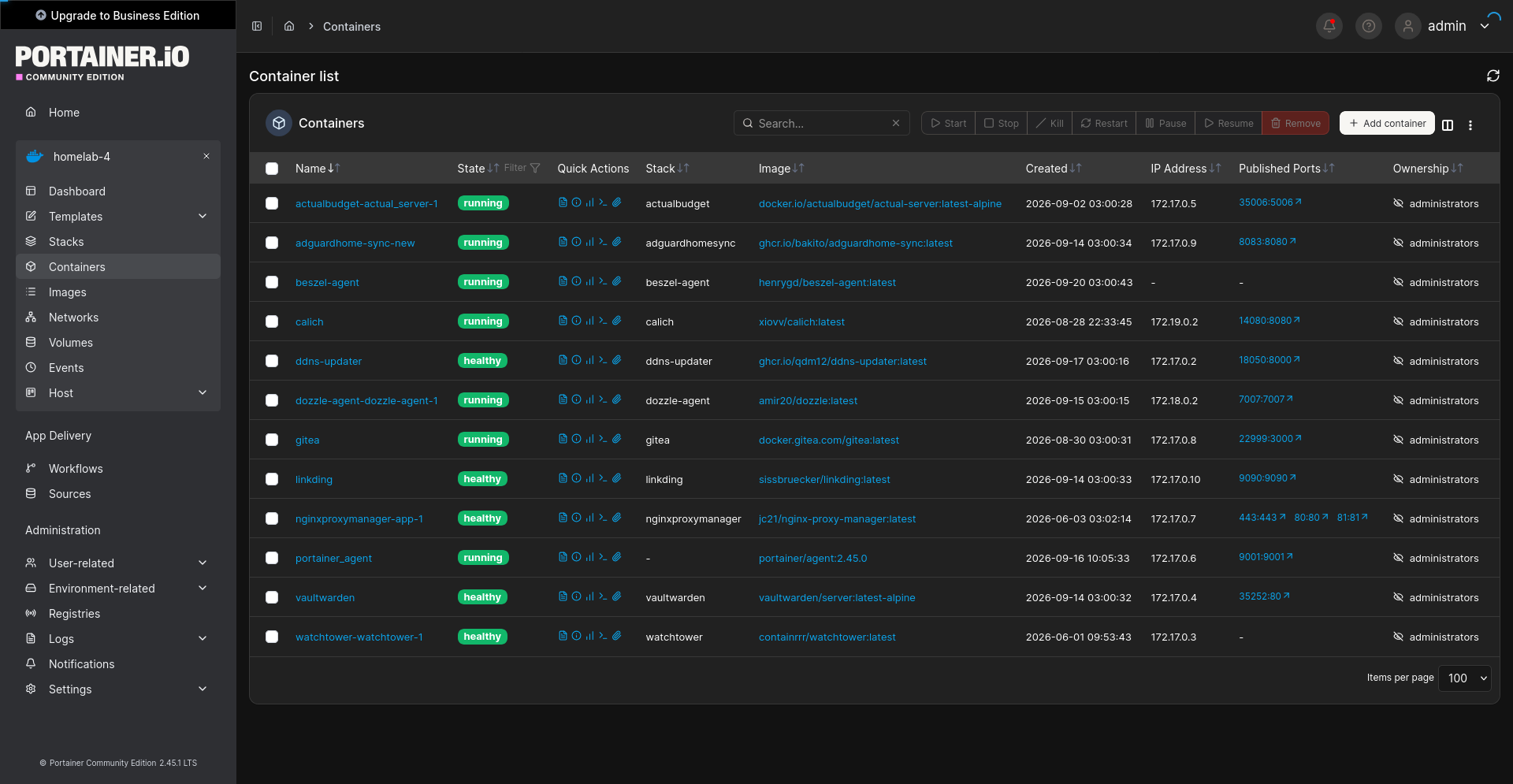
Screenshot of Portainer, showing a list of Docker containers running various Foss apps
In your example it would use that much and no it can't be shortcut, that'd be a big security bug and is not intended.
The reverse proxy is just a piece of software and can be on the same machine as the actual service, but yeah, if you don't have a public IP at home, you'll need someone like you described and it will need the traffic.
I think there's different software that does hole punching and actually gets you a peer to peer connection but there's more vpn territory where the vps is just used to find a way between the peers.
For most use cases, the free traffic is usually enough though.
Most likely yes, but I don't know any I can recommend, sorry
Because you don't have a lot of experience with this type of stuff, I would not recommend exposing all your applications to the open web unless you also are willing to install and maintain some sort of security dashboard or traffic analyzer with alerts in case someone is trying to do something malicious to your services. You can always tunnel in with a VPN at the flip of a switch. This would only expose the VPN to the open web, which is a much smaller attack surface than all your services. You could also use something like Tailscale to keep all the devices connected but not exposed to the open web.
I would recommend going this route as a beginner hobbyist just so you don't have to be worried about the security of your server as much. Hope that helps!
Could you help me learn something conceptually about a reverse proxy?
My understanding is that Virtual Private Servers (vps) charge for bandwidth after you exceed a free cap.
If I set up nextcloud behind a reverse proxy, so that I'm not exposing my residential IP address to the internet, does that mean that when I upload a 500 gigabyte file, let's say, I will incur 500 gigabytes of usage on the virtual private server?
Or is there some system where once you log in to your server, it is smart enough to make a direct connection from the client to the residential IP and bypass the reverse proxy?
Are there any good guides that you would recommend to a beginner on how to properly set it up?
Nextcloud is fine without Anubis since everything is behind a login.
Yes, you need a reverse proxy. Also you need a public IP which not all ISPs offer. If you have one, you have to forward port 443 to the reverse proxy in your router config. That means someone who tries to connect to your router on port 443 will be forwarded to the reserve proxy who checks which domain was looked for and forwards to the actual Nextcloud.
You'll need a domain pointing to your public IP. That IP may change, so you need an automation that updates the DNS records (known as dyndns). When you're selecting a registrar, look for one that has dyndns support (you can use different nameservers but that's unnecessary extra steps).
Makes sense! Rate limits are important IMO and most sites don't seem to have them.
The bots don’t care about Anubis, though. Yes, their request will take a bit longer, but since each request is coming from a different device, they don’t care. They’ll just do the pow in parallel. And in the meantime you’re annoying every actual human visiting your site.
This seems to be exactly the content of the post: rate limit + Anubis.
The main point is more about "How to setup Anubis" rather than "Should we use Anubis" as I documented how I did my setup so I will not forget and at the same time sharing the resource. I am also using fail2ban but I didn't feel a post about how to set ip up would be as useful as documentation and guides seems already there.
Isn't the use of different random IP per request by bots a stronger arguments in favor of the default Anubis behavior? This would mean a lot of POW to be done by the bots.
The deep link accesses is worrying indeed and Anubis is not a silver bullet.
I also agree with the use of a known abusive IP database.
I just let it rip this morning and no issues whatsoever
I feel like a simple rate limit set to what your server can handle without issues is a better solution. Or combine it with Anubis at least.
I accidentally yolo'd this update last night and it's working fine, so you have at least one piece of anecdotal evidence.
For me, every single request is coming from a different random IP address (different ASN, different country, etc.) using a random plausible User-Agent. There's no way to discern them as bot requests. And since every request is coming from a random source, things like fail2ban or CrowdSec don't really work. You can block a few major ASNs but there will still be lots of requests making it through.
And these things work by going through a list of URLs previously collected. About a week ago I've configured a redirect for ALL requests to my personal Gitea instance to a zip bomb. It's been 7 days now where the website was inaccessible and I still see requests for deep links, e.g. specific commits or lists of pull requests. These things are relentless. That's also one of the arguments against Anubis - those scrapers just don't care.
I've found some comments that at least a few ISPs check AbuseIPDB.com and cancel their customer's contracts if their IP appears in that database. So, I've now resorted to occasionally collect those IPs hammering my poor Raspberry Pi and reporting them to the AbuseIPDB. If people are unknowingly running a "residential proxy" (why don't we call them "open proxies" anymore?) somebody needs to let them know, I guess.
im gonna yolo this update like its my last day on this planet
yall kept fearmongering this and i prepared for this damn update and it was literally just clicking update and waiting for the docker container to update.
Thank you for taking the time, I will definitely take these points into consideration.
So the docker container image-watcher and update-coordinator seems quite incongruous with the rest of the tool. It looks like a "network visibility tool" with the container manager just tacked on as scope creep.
I presume if the container is actioning the updates for you, it also requires docker socket privileges? I imagine that will give a number of people pause about installing it on their homelabs, as "cool looking vibe-coded personal project with docker socket privileges" is a ticking time bomb from a cybersecurity perspective.
If it does require docker socket (and Can't imagine how the container management would work if it doesn't) you night have more success getting uptake in users for feedback on the main features if you remove the tacked on container manager and just keep that part for your own personal implementation of the application.
A lot of the non-article content on the site read a lot more corporate/generic/AI-vibes than I think you'd like given what you wrote in your AI-usage disclosure article. You might want to go through the non-article copy and see if it can be edited more heavily to actually make it sound like your voice saying it.
Some examples include:
"No accounts. No “Premium” tiers. No metadata harvesting." on your wallpapers page
"Whether you’re a Linux veteran or just looking for an alternative to the Windows/Google ecosystem, I aim to provide direct, no-fluff content based on real-world testing." in the about me section
They stick out really hard when contrasted against your articles, because you can see that your articles actually have your own voice in them. I know you've got the line "I'm a sysadmin not a copywriter" in a few places, but really, if you have a blog, you'll be alienating your readers by not atleast trying to be both.
Also your 'tools' page is probably the coolest part of your site so I think it really deserves a section pointing to it on the homepage, since most people don't go straight for the nav menu.
To end on a sweeter note, I really like the visual styling you did for the archive it's really cute and it pleasantly surprised me.
Always open to feedback
Wait y'all aren't just auto updating all your services until it stops working then panic fixing it?
TIL
I YOLO updated with Watchtower. Nothing broke. I survived the 12.0 update unscathed this time.
nice one, always good to have a little reminder to update my outdated services pop up in my feed lol. Had a little peruse through the rest of your website after reading, did a little snoop on the services you're hosting on your homelab atm hehe. Would you be open to a little feedback on the site from a random stranger's perspective?