I have a small keychron, 65% low profile for my Steam deck that sits in front of my 96% for my MacBook. The 90° usb lets me get them close together.
comments
That's cool still
This feels like a dullsters update, but I got a 90° usb-c to charge my keychron while in use so the cable is not bumping the other stuff on my desk.
comment on
It's got a METH key!
Cock and Meth?
comment on
It's got a METH key!
It's s keyboard that allows Walgreens pharmacies to operate at the speed of fossilization. Greatly upsetting the very patient and kind customer base who don't bother to check for their messages informing them their drugs are ready for pick-up.
Ask me how I know
comment on
It's got a METH key!
Yeah, that Control key is like the opposite of the Severance keyboards.
comment on
It's got a METH key!
Ahh, but is it a FUN keyboard, or a narc keyboard?
comment on
It's got a METH key!
In the picture you can just make out the Pro Micro "Soarer's Converter," which I flashed to use a firmware that includes the VIAL graphical configurator. I then taped that old Micro-USB cable to secure it and stuffed the whole thing into the case.
Hardware wise, this is a simple PS/2 to USB conversion, but because it was made for a bit of commercial lab equipment, the software side got a little weird, almost like it was high on something, LOL. The numpad doesn't include the usual math operators, NumLock is non-existent (and in fact this keyboard forcibly turns it back on if you find a way to turn it off), there's no Windows/Super key (not uncommon on older designs), 34 of the keys above the main clusters actually send combined keys (F9+A through F9+Z, then F10+A through F10+H). Someone else had already figured out that using F9 and F10 as your "layer switch" or "Function" keys is the way to unlock that, so I did the same. I only had one extra layer (plus two "Combo" keys) to play with, so I was only able to convert 28 of the 34, but those 28 now do pretty normal stuff: F keys, navigation keys, media keys, etc.
The other quirk is that, while the slightly longer spacebars (7 key "units", versus the usual 6.25) are not rare for keyboard nerds, the stabilizer rod for this one is on slightly nonstandard spacing, so I'm stuck with it until I can source another one. Luckily, the caps themselves are pretty decent.
comment on
It's got a METH key!
CONTROL
comment on
It's got a METH key!
god bless this meth.
comment on
It's got a METH key!
To quote Jenna Maroney, "they contain a little bit of meth which is something my body needs anyway."
comment on
It's got a METH key!
Agreed. Many Amigas had a shape and color scheme that was fairly similar.
comment on
It's got a METH key!
SMASH that p8 until your eyes dilate
comment on
It's got a METH key!
Reminds me of the original Amiga computers.
comment on
It's got a METH key!
I hear meth is a hell of a key.
comment on
It's got a METH key!
[deleted]
comment on
It's got a METH key!
How did you convert it? Slapped on a standard PS2 to USB converter, or something fancier?
comment on
Evoworks Evo75 review
I am anxiously awaiting my 80. Everything about these keyboards looks so nice at that price point.
comment on
Banana keyboard

comment on
Banana keyboard
dang it, saw the pic and immediately went into the comment section to say "Ring Ring Ring Ring"
comment on
Banana keyboard
The perfect desktop complement to the Bananaphone
Or if you prefer
I made a silly but fun WriterDeck that lasted about an hour before the cheap powerbank fried my Pi Zero. Then, like a dope I figured I could make it work with my Libre Computer Le Potato and the thing fried my touchscreen. Sent the battery back and got an old-ass refurbed ARM ChromeOS tablet instead (Lenovo 10e). Even if I can't get full Linux working (and I'm informed this one supports it), *and *even if it's slow as molasses, this use-case should still be fine. I will also be printing a "case' to shroud the DIY keyboard from the picture. It's based on the same PCB as one of my favorite DIY boards, so it'll be a nice one to use with a portable device. Outemu "mid-height" Black and a no-stabilizers layout.
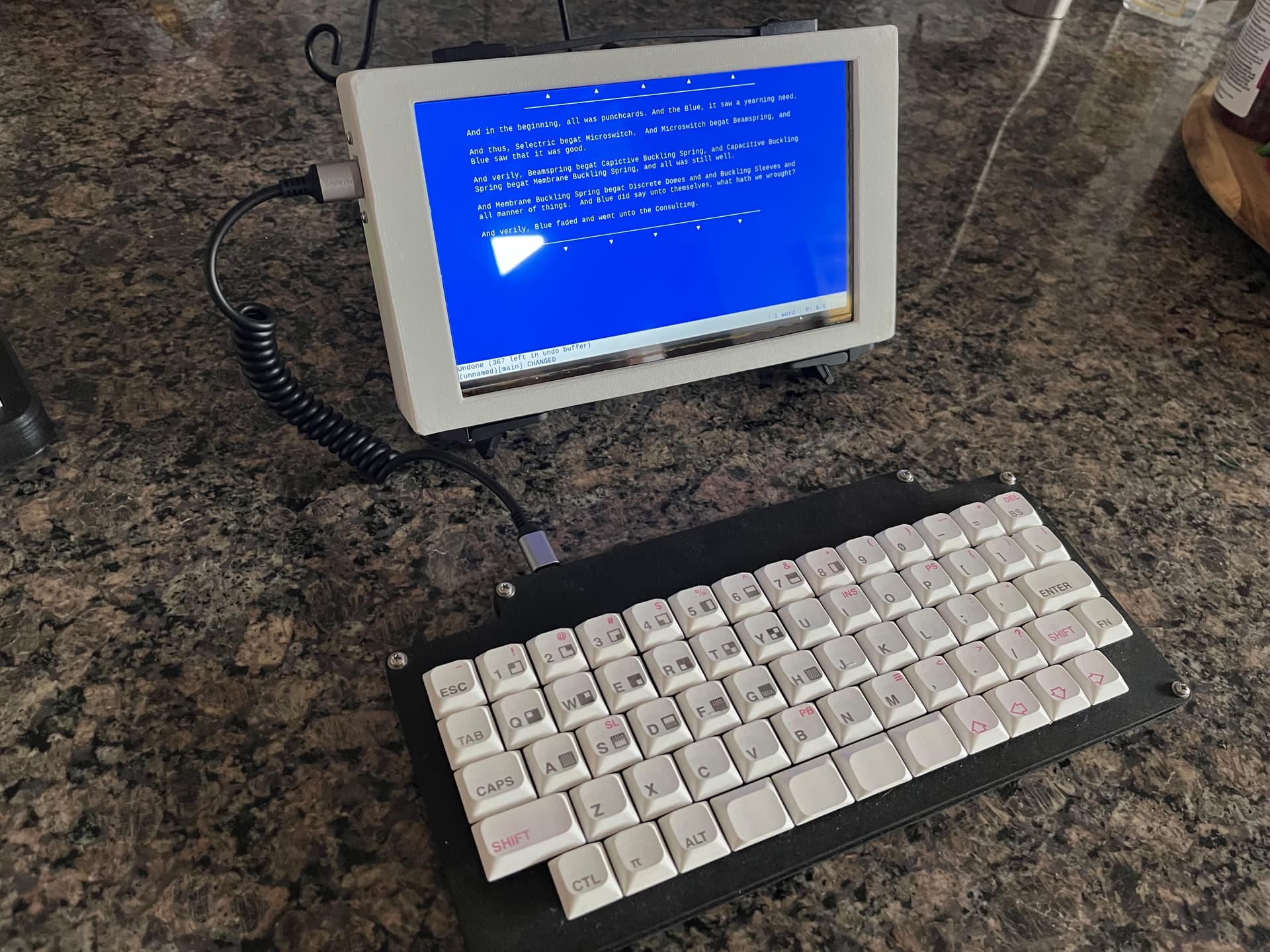
Even if you don't buy a Keychron, and there are arguments for an against, the sheer variety they offer is a good primer for getting up to speed on what's broadly available.
comment on
Corneucopia
👊👊lookin ass keyboard
Keychron has a lot of options including some with hot-swap sockets that let you change the switches without desoldering. If you like clicky switches I would try out Kailh BOX white/jade switches, or just order a switch tester or something.