I felt like fixing a thing in qtcreator and tried git clone https://code.qt.io/qt-creator/qt-creator.
It took over 2 hours to reach 13%. I thought there may be a problem with using https or maybe it was just a network thing, so I tried gi clone git://code.qt.io/qt-creator/qt-creator.git and it turned out to still be as slow.

While normally opening code.qt.io and using the cgit was pretty snappy, with git, I am getting an average download speed of 10KB/s.

  • Is this how the server is normally configured?
  • Is this only happening with me or do others have the same experience?
  • Did I just get unlucky and try to download during the a maintenance day?

Similarly, git clone https://code.qt.io/qt-creator/perfparser was also as slow. Although it finished in under 10 minutes because it was a small project.


cross-posted from: https://programming.dev/post/43343171

I just started checking out auditd and made a rule to log file accesses.

auditctl -a always,exit -F dir=/path/to/my/directory -F perm=rwa

From the output, I got some things that might be useful:

  • The full path of the executable
  • pid
  • Parent's pid: ppid
  • Process' current working directory cwd

Now if the process was still running when I check the logs, I could open htop and find out what exactly called the process, from the pid.
For example, say I run a git pull on a repository and find out that /usr/bin/ssh is accessing some file, I will get something like:

st
└ bash
    └ git
        └ ssh

I will get the full executable path of each executable (and know if the executable was not in the system directories, but in some unsafe location writeable by another user). This will give me enough context to go by.

But using this same example, what happens if I check the logs after the git operation has ended?
The git process ppid will have been lost(?) and I would have no way to know which process called ssh.

How do I solve this condition?
Ideally, I want to have the audit log contain the whole calling tree with the full executable path of each parent.


I just started checking out auditd and made a rule to log file accesses.

auditctl -a always,exit -F dir=/path/to/my/directory -F perm=rwa

From the output, I got some things that might be useful:

  • The full path of the executable
  • pid
  • Parent's pid: ppid
  • Process' current working directory cwd

Now if the process was still running when I check the logs, I could open htop and find out what exactly called the process, from the pid.
For example, say I run a git pull on a repository and find out that /usr/bin/ssh is accessing some file, I will get something like:

st
└ bash
    └ git
        └ ssh

I will get the full executable path of each executable (and know if the executable was not in the system directories, but in some unsafe location writeable by another user). This will give me enough context to go by.

But using this same example, what happens if I check the logs after the git operation has ended?
The git process ppid will have been lost(?) and I would have no way to know which process called ssh.

How do I solve this condition?
Ideally, I want to have the audit log contain the whole calling tree with the full executable path of each parent.


ffmpeg ... -c:a flac -exact_rice_parameters 1 -multi_dim_quant 1 ...

I was encoding wav to flac.

  • With default options, the result was almost instant
    • At > 500x speed
  • Used -compression_level 12, finished in ~ 7 seconds
    • speed = 48.9x
  • Then I used multi_dim_quant
    • After ~ 10 minutes, I checked the speed to be ~ 0.02x. So thought it would take an hour or so. 1.30 seconds worth of audio was encoded
    • It's been over 2 hours now.
      • Shows 1.46 seconds of audio encoded with current speed = 0.00017x

Considering running it in a VM, so I can "pause" it whenever I need to restart my computer.

Update:
size= 123KiB time=00:00:02.82 bitrate= 356.3kbits/s speed=4.68e-05x
It stopped trying to use layman notation.
I'll need to restart soon-ish, but I'll see how far this goes and if the 2.82 seconds of audio is even listenable.


I come from EndeavourOS and when I installed Arch manually, I realised that I had to systemctl enable quite a few services. That included NetworkManager and sddm.

I was wondering if there exists some PostTransaction hook available that would prompt me about enabling a service/socket after a package installs one?

So, if I were to do pacman -S extra/bluez-obex, it would later prompt me with:
Enable obex.service? [g|global] [u|user] [n|no]
And if I were to answer with anything other than "no"...
Start now?

Might be different for system services, but you get the point.


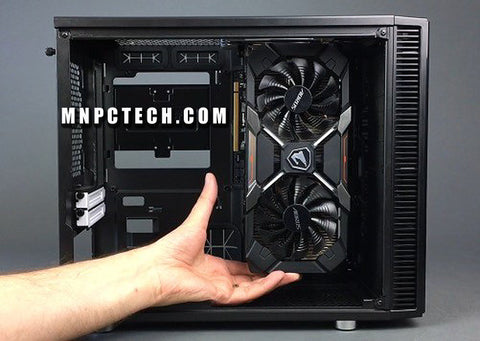
What is the rationale behind GPU heatsink fin design?

So I have seen a few GPU heatsinks and I wonder why some of them are how they are.

GPU placement in Cabinet

The originally intended and most widely used placement for ATX cases at least, is installing right on the PCIe slot, which goes horizontally and with the air incoming from the front of the case.

gpu_traditional_fit

Then we have the "vertical" placement using the riser cable, which changes the direction from which the GPU fans take in air, but keep the GPU front, in the same direction, again lining up with the incoming air from the front.

gpu_trendy_fit

Finally the very rare vertical placement, which has the front of the GPU rotated towards the top of the case, making it not line up with an airflow incoming from the front.
This also makes the GPU's ports inaccessible the standard way, giving a reason to the rarity.

gpu_exotic_fit

Some examples I found for this

Here we see that the first 2 placements would make up most of the ATX PC builds with the third one being either for different case styles or for extensively customised builds.

Fins, fans and airflow

I would assume that having the air flow along the fins would be better than it crossing the fins at ⦜90°. And even if the air flow due to the case inlet is being ⟂ to the airflow from the GPU fans (in case of front incoming air flowing along the fins), it should still lead to overall increase in air pressure (hence, air density) between the fins.^[Source: Mental simulation] Considering that GPUs tend to have gaps in the IO shield to let the air go out the back, I would assume they (designers of the thermal dissipation solution) want air from the fins to go out the back, which would be better with fins parallel to front incoming air.

gpu_airflow_illust

Inference and Doubt

From the above 2, it would make sense for most GPUs to have their heatsink fins going along their length instead of their width, right?

Then what's up with the ASRock lineup, with all cards other than the Passive model, the Creator cards (which have the front covered by the shroud anyway, so no incoming airflow) and the watercooled cards (which is not applicable) having the fins ⟂ to front air inlet?
And of course they are not the only one doing it that way.


Follow Up

While discussing in this thread, I realised another point (which I didn't state anywhere in the comments):

  • While it is desirable to have higher air density, it is not desirable to have air increasing in density while in the inter-fin space. Because that would cause the heat released when changing density to be transferred to the fins.
  • Another way to say that is, the air will get hotter, while increasing its density. So, how much this factor matters, will depend upon the initial temperature difference between the air and the fins and how long the dense air stays in the inter-fin space. Oh and also the composition of air.