Direct link to post: https://lemmy.ca/post/2890824
comments
comment on
Welcome new users to piefed.ca and lemmy.ca!
comment on
Welcome new users to piefed.ca and lemmy.ca!
I want to add to new users, to make sure to check Hot, Top every 6 hours, Scaled, Active, etc. if they aren't seeing interesting things. For Lemmy, Active shows up as the default and it comes across as the least active.
comment on
Welcome new users to piefed.ca and lemmy.ca!
Hi Canadians! 👋
comment on
Welcome new users to piefed.ca and lemmy.ca!
Sorry to anyone that might be waiting for a reply from me on reddit or on here, I’ll be away for a few hours. You are in great hands here with the rest of the admin team and the wider community :)
comment on
Welcome new users to piefed.ca and lemmy.ca!
We're also configuring our server to handle the load. It definitely has the capacity for it, but there may be intermittent outages as we restart things.
Judging by the time of our comment, I think we were making a config change right around when you made that comment
comment on
Welcome new users to piefed.ca and lemmy.ca!
If people are having issues they can alternately try piefed.zip
It might ease some server load
comment on
Welcome new users to piefed.ca and lemmy.ca!
Can you try again now? I think there are two potential causes:
- Our server is being overloaded with new people
- Around 15 minutes ago, we upgraded the server specs to handle the increased load, and so it might have been down right as you were trying it
comment on
Welcome new users to piefed.ca and lemmy.ca!
You should be able to just click login, select the server and then login
Like this:
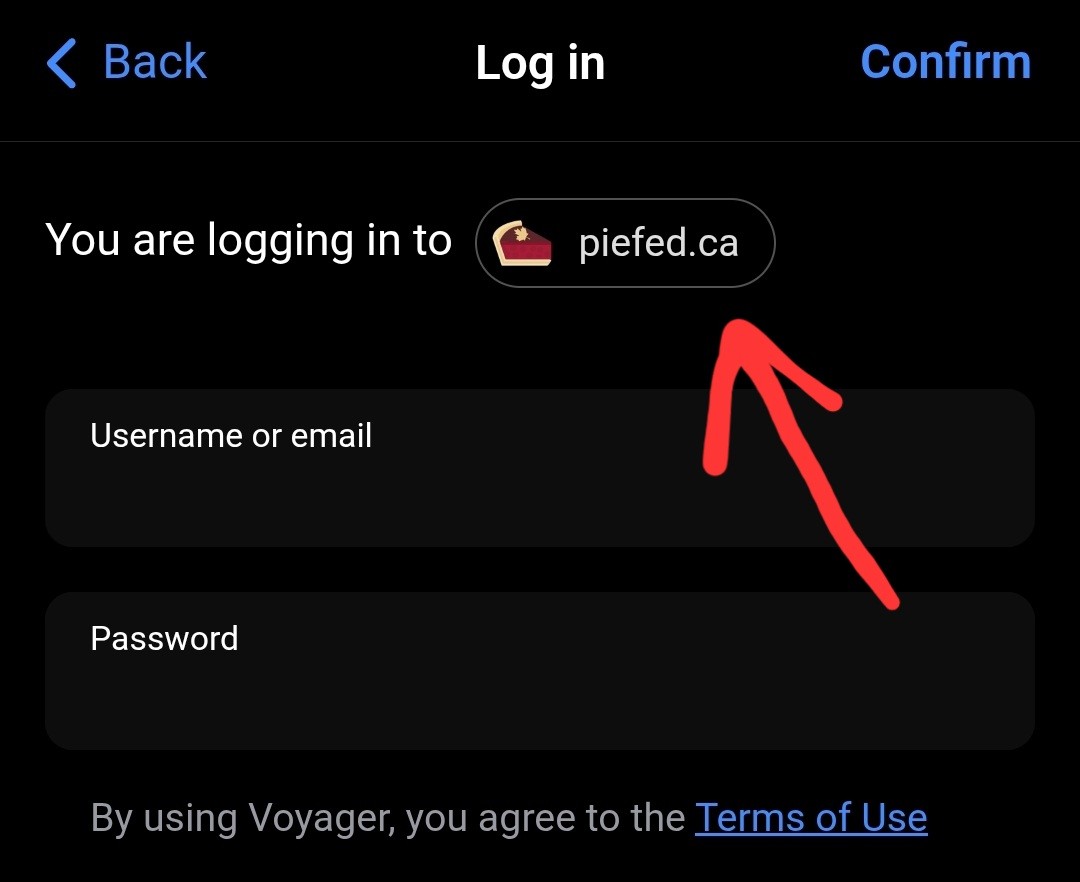 With the same username and password you used to login to PieFed.ca on your browser.
No nees for a lemmy.ca account.
comment on
Welcome new users to piefed.ca and lemmy.ca!
“get started” from lemmy.zip
You should be getting started with piefed.ca. Is it a pulldown?
comment on
Welcome new users to piefed.ca and lemmy.ca!
Piefed.ca is currently down!! Must be A LOT of interest.
comment on
Welcome new users to piefed.ca and lemmy.ca!
Thank you for this. This is exactly what I've done and I run into a connection error notice. Turned off wifi and tried again, still not working.
comment on
Welcome new users to piefed.ca and lemmy.ca!
Boost also supports Piefed, the login process is similar on Boost :)
comment on
Welcome new users to piefed.ca and lemmy.ca!
I've installed Voyager already yes. On the app I select the "get started" from lemmy.zip and from there I can either click "join lemmy.zip", "picker another server", OR click "login"
When I click login, I can select the piefed.ca server and then enter my info and that's where it says "connection error, please try again"
Do I need to first make a lemmy.ca account?
comment on
Welcome new users to piefed.ca and lemmy.ca!
You might have to type in piefed.ca as your instance. I think it asks what instance you're on, but it's probably not on the list. Once you're in, you'll love it and all of this is worth it. I swear.
Edit: Also, it looks like there is a voyager crypto app, be sure to get the lemmy version. https://vger.app/
comment on
Welcome new users to piefed.ca and lemmy.ca!
For sure! Here is what I did:
- Tap the profile icon in the middle of the bar at the bottom of the screen (it might have the text "lemmy.zip")
- Tap "Get Started"
- Select "Log in"
- Type in "piefed.ca", and confirm that you understand the support is experiemental
- Log in with your username and password
The same app can be used to sign in to a number of websites, so that might be the point of confusion. However, once you have signed in, you should be able to use it normally from here on out :)
comment on
Welcome new users to piefed.ca and lemmy.ca!
Have you installed it already, what issue are you running into?
You should be able to select PieFed.ca and login with your credentials
comment on
Welcome new users to piefed.ca and lemmy.ca!
I use boost or synch, but I'm using lemmy.ca and not piefed.
comment on
Welcome new users to piefed.ca and lemmy.ca!
Just joined. I was suggested to use an app called Voyager for this. Having some trouble getting that to work. Does any have a step by step? I've already registered and been approved for piefed.ca. So when I went to login, it gives me an network error.
Edit: looking into it more, do we have to make a lemmy.ca server account as well?
Edit 2: after waiting for a while and trying a few more times before waiting longer I am happy to update that I am now logged into the Voyager app on my account using the easy steps provided and I think it was simply just a server load issue that needed time to just resolve itself. I'm happy to be here and can't wait to see what's going on!
Thank you all for assisting me!
comment on
Welcome new users to piefed.ca and lemmy.ca!
I saw this thread on Reddit
https://www.reddit.com/r/BuyCanadian/comments/1qr4tji/a_canadianrun_reddit_alternative/
This might have helped add some users.
Hopefully there isn't too much friction in joining and finding communities across the Fediverse.
And welcome everyone!!
comment on
Welcome new users to piefed.ca and lemmy.ca!
Greedy little boot licking pig boy
comment on
Welcome new users to piefed.ca and lemmy.ca!
Spez is a pissbaby!
comment on
Welcome new users to piefed.ca and lemmy.ca!
Let's goo!!!
Find a Organized List of Canadian Communities here --> !canada@lemmy.ca
comment on
Welcome new users to piefed.ca and lemmy.ca!
Welcome to the resistance!
comment on
State of the Instance request
Yeah it's something I'd like to do too, but I'm currently pretty busy between day job and my various projects. Will try to put something together in the next few weeks.
❤️ 1
comment on
Lemmy.ca now upgaded to 0.19.15
Thanks for all your hard work!