1


Do you have a favourite? I very much like sigmoid's simplicity for how fast you can obtain a good baseline result with often just two intuitive sliders to fine-tune in subsequent modules if needed.

I dabbled with the new AgX, but it hasn't clicked for me, yet. Some of the tutorials make AgX seem intuitive in its own right, but for me it seems the colors are thrown off when I use it which then leads to an editing goose chase I didn't ask for. Has anyone else encountered this? Does AgX warrant a bit more preset finetuning of the individual color channels for a specific camera body?

2
3
darktable 5.6.1 released (www.darktable.org)
4
5


For the family album, I’ve been exporting my photos in Darktable to JPEG (8-bit) format at 90% quality. The images are organized into albums online using Nextcloud. But I’m reaching the limits of my available storage space. Typically, each *.jpg export creates a file ranging from about 20MB to 38MB. I haven’t paid much attention to this before, but I now realize that’s a lot. It quickly adds up to a few GB. If I reduce the quality to 85%, the files are just under 25% of the size compared to the 90% quality export. At least on the web, I don’t see any difference at first glance.

Since some family members occasionally create a photo book from the pictures, I’m not sure how the quality will hold up in print. I won’t know for sure until it’s too late. But if I can’t tell the difference at 100% zoom, I’m hoping the print quality will be at least acceptably similar.

According to Google Page Speed Insights, it’s recommended to use WebP with a quality of 80%. The resulting files are now only 20% as large as the 90% JPEG exports. I notice slight differences, especially with smooth color gradients, bokeh, and similar elements. There are subtle variations and color shifts, but hardly any artifacts. If I don’t know the original, it doesn’t stand out. But it does in a direct comparison. I can’t estimate how this will affect the print as a photo book. What I do see, however, is a significantly longer export time.

Question for the community: What would you recommend? Stick with 8-bit JPEG and set the quality to just 85% (or less), or switch to WebP with 80% quality? Maybe you have another or better idea?

BTW: One additional question. Pixel dimensions of the photos are usually huge in my case. I don't scale down the pictures during export, because i don't know how to do that. Some photos are landscape, some portrait, some are cropped, some not. So every photo can have a other resolution. What should i use to have a max resolution of 2560x1440 Pixel and keep the aspect ratio of landscape and portrait and cropped images. I don't want to upscale images, only downscale, when they are bigger as the max resolution. I don't understand the documentation of the setting.

6


#askfedi #darktable #pixelfedIs there a best practice - or even some form of plugin/automation that allows exporting from @darktable straight into the fediverse? Ideally into @pixelfed ?

7


Debian 14 rend les reproductible builds obligatoires [1]La version Forky de @darktable compile de façon déterministe 👍reproduce.debian.net/amd64/forMais la question se pose pour DisplayCAL.Le paquet est (pour l'instant) bien dans les dépôts de Forky [2] mais reproduce.debian.net ne retourne aucun résultat, ni positif, ni négatif ni message d'erreur genre paquet non trouvé, pour "displaycal".Et du RAW sans gestion colorimétrique…1. lists.debian.org/debian-devel-2. packages.debian.org/forky/disp

8


Je trouve qu'il y a quelque chose de diablement plaisant, reposant et méditatif dans le développement de photos 😌 Image en cours de développement...Je vais sans doute recommencer depuis le début. (et oui l'edit se fait d'un jpg et pas un raw 🫣)Je prends en main (enfin sérieusement) @darktable, découvre complet le scenes-refered et nv outils agX. Franchement, je ne cesse d'être impressioné par la qualité de cet outil, de sa doc. et sa communauté !#photography #graffiti #libre #streetart
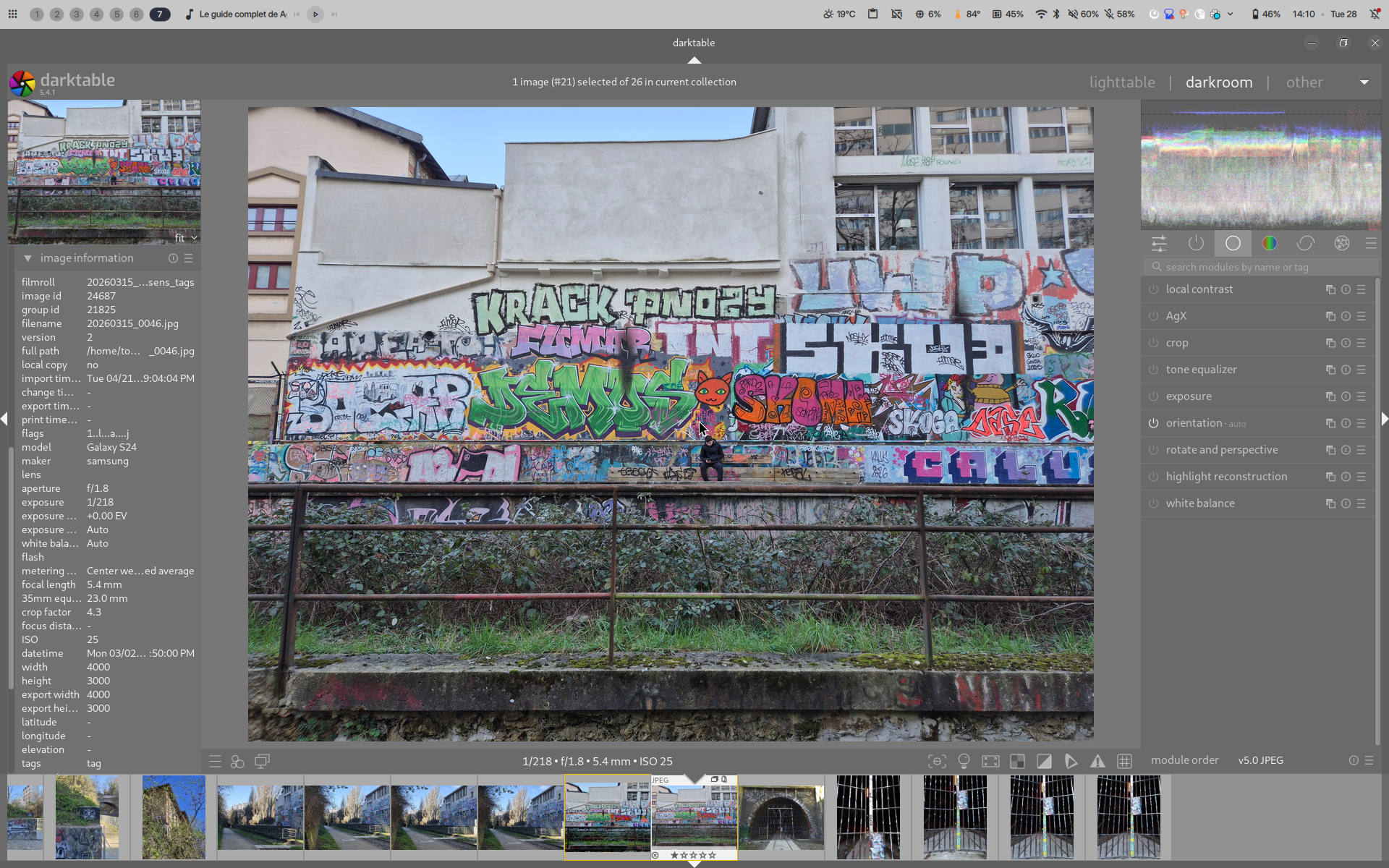
A screenshot of Darktable with an image being processed. 

The scene shows a person sitting on a bench against a wall from afar. The person's is looking at its phone, in black clothes, The background that thakes most of the scene space consists of a some wild bush behind an old ruty fence, the wall is covered in beautiful colored tags that goes from left to right of the image and 3 meters high. There is also some windows on the right top of the photo
9
10


After helping some other users with Darktable’s Negadoctor module, I thought a workflow demonstration video might be helpful for others.

It this video, I use Flextight 3F scans but the negadoctor module part is applicable to dslr or other scanning formats.

11
12


Guys, I just learned about this new FOSS editor called "RapidRAW" on GitHub, and this might well be the Lightroom (non-Classic) killer as Darktable is to Lightroom Classic. See, as much as I love Darktable for its power and feature set, most of my non-tech photographer friends have mentioned how its power comes at the cost of complexity even beyond LrC. Yes, I love DT, but I do have to agree – It can be overwhelming to a newer user not as familiar with LrC or wanting to learn a whole new program just for quick edits.

...and then I found RapidRAW! This looks like it could be it: A sleek, lightweight, elegant, comprehensive (enough) editor that seems to finally strike the balance between power and beginner-friendliness! Even better, like Darktable, it too appears to be FOSS, breaking away from the money-hungry Adobe corporate software! Now, I've only just started looking into it, but what do you think? Could this be the next piece in the essential toolkit for Ex-dobe users switching from Lightroom but not quite wanting a full LrC replacement? Check it out!

https://github.com/CyberTimon/RapidRAW

13
14


At some point while I was fiddling, Darktable asked me whether I wanted to get rid of the script manager (hide it? disable it? I don't recall) and I clicked "yes" by mistake: now there is no script manager in my left bar.

Do you know the "proper" way to get it back? (ie. one that is not "delete all darktable settings from your home directory") I searched the preferences but didn't find anything.

15